One post tagged with "Cyberinfrastructure"

View All Tags

Expanding Access to NextGen Research through the CIROH Community NextGen Hub (CCNH) in Cloud


· 5 min read
Ayman Nassar
Postdoctoral Researcher
David Tarboton
Professor at Utah Water Research Laboratory
Arpita Patel
Assistant Director of DevOps and IT
Furqan Baig
Research Programmer
Homa Salehabadi
Postdoctoral Researcher
Benjamin Lee
Development Operations Engineer
Josh Cunningham
Software Engineer

Opening New Doors for Research with the NextGen Framework

The NextGen framework holds great potential for hydrologic modeling, but is often inaccessible due to its strenuous setup and requirements. As such, embedding it within a cloud-based framework offers a natural solution to this problem by removing some of the administrative and technical requirements for compute resource setup and computational library configuration, thus opening the door for a wider audience to tke advantage of the strengths of the framework.

With the CIROH Community NextGen Hub (CCNH), we’ve created a cloud-based environment that addresses exactly those setup challenges, so users can focus on science instead of software.

A Preconfigured, Ready-to-Use Cloud Environment

CCNH is a containerized, cloud-based modeling environment hosted on the CIROH-2i2c JupyterHub. It packages everything a researcher needs to run end-to-end NextGen workflows — from input preprocessing through model execution, calibration, evaluation, and output visualization — into a single, ready-to-use JupyterHub image. Built on the same containerization patterns as NGIAB, CCNH leverages a Pangeo base image and includes:

  • Pre-compiled NextGen framework binaries from NGIAB based docker image
  • NGIAB data preprocessing tools for automated retrieval and subsetting of hydrofabric and meteorological forcing datasets
  • T-Route routing components for streamflow simulation
  • SPOTPY(Statistical Parameter Optimization Tool for Python) for model calibration
  • TEEHR(Tools for Exploratory Evaluation in Hydrologic Research) for performance evaluation
  • PyNGIAB, a Python wrapper that lets you run NextGen simulations directly from Jupyter notebooks
  • HydroShare integration tools (nbfetch, hs_files-jupyter, hsclient) for seamless data exchange to save results in HydroShare for collaboration, reproducibility and publishing
  • JupyterLab with distributed computing capabilities for interactive, scalable workflows
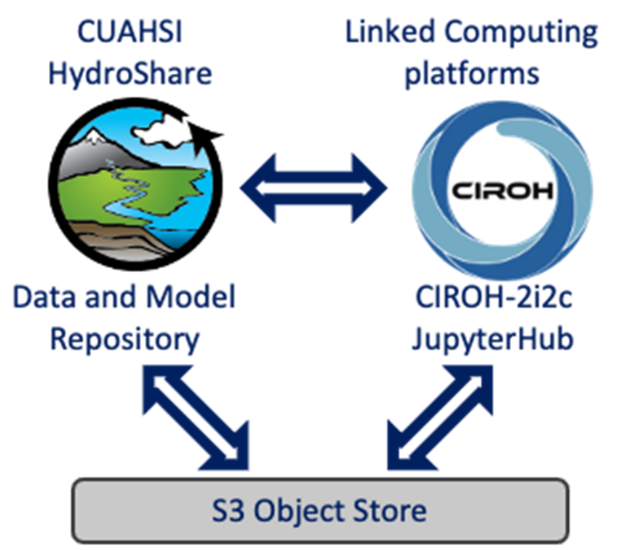
Diagram illustrating how HydroShare resources, 2i2c JupyterHub, and S3 Object Store interact to enable streamlined NextGen workflows in the cloud.

The result: researchers can go from zero to running a calibrated NextGen simulation in a fraction of the time previously required.

Streamlined Workflow, Clear Results

Through guided notebooks, users can:

  • Prepare and subset input data
  • Run simulations
  • Calibrate models
  • Evaluate performance
  • Explore outputs interactively

...all within a single environment designed for efficiency and discovery.

Why It Matters

By lowering technical barriers and using a cloud-based approach, CCNH makes NextGen accessible to a broader research community. It allows scientists to spend less time on setup and more time advancing hydrologic understanding.

How to Access CCNH

Picture of the CIROH-2i2c JupyterHub interface showing the Server Options page where users can select compute profiles and the CCNH image to launch a NextGen modeling environment in the cloud.

There are two primary ways to launch CCNH in the CIROH-2i2c JupyterHub environment:

Option 1: Launch Directly from CIROH-2i2c JupyterHub

  1. Go to: https://ciroh.awi.2i2c.cloud/
  2. Click “Login to continue” and authenticate with your CIROH credentials. (If this is your first time, you may be prompted to authorize access through GitHub.)
  3. On the Server Options page:
    • Select the desired compute profile (Small, Medium, Large, or Huge).
    • Select the CIROH Community NextGen Hub image.
  4. Click Start to launch the JupyterHub.

You are now inside a CIROH 2i2c JupyterHub session running the CCNH image, which provides a fully configured NextGen modeling environment.

Option 2: Launch from a HydroShare Resource (“Open With”)

One of the most powerful features of CIROH-2i2c JupyterHub is its integration with HydroShare. You can open a HydroShare resource directly in a CIROH-2i2c JupyterHub session running the CCNH image:

  1. Navigate to a HydroShare resource. (for example: https://www.hydroshare.org/resource/27045581bdea4808a393330f2417379c/)
  2. Click Open With (top-right of the resource page) and select CIROH-2i2c JupyterHub.
  3. Click “Login to continue” and authenticate with your CIROH credentials. (If this is your first time, you may be prompted to authorize access through GitHub.)
  4. On the Server Options page:
    • Select the desired compute profile (Small, Medium, Large, or Huge).
    • Select the CIROH Community NextGen Hub image.
  5. Click Start to launch the JupyterHub.
  6. (If you did this with the example resource above, click on and launch one of the Jupyter Notebooks to step through the NextGen workflows.)

References